Showing posts with label photoshop. Show all posts

Saturday, June 10, 2017

Photo Fishing


As I have mentioned a few times before, I love walking along downtown streets, taking pictures as I go. I might take 200-300 shots in an hour or so. Then I sit in a comfy chair and look through my shots to see what goodies I caught. My favorite subject matter is store windows -- day or night -- because you can see the inside and outside world at the same time.

I was just in Manhattan for a business trip and had several opportunities to snap photos as we walked to dinners and around the hotel on the last morning in town.

Below are some examples of how there can be hidden gems in your pictures. "Zoom in and crop" is how you can take a picture from ho-hum to hmmm!

Each set of pictures shows the original and then the cropped version I made. In some cases I also used Photoshop to boost the color or add a filter.

A random street turns into...


...a story about people and cars in close spaces
A nice pink jacket, but nothing to see here, right?...

...look at the almost abstract hiding in the lower left corner.
I used a filter but can't remember which one -- maybe Paint Daubs.


I liked the strong sunlight framing the couple who had been walking in front of me so I snapped a series
and liked the pose below that turned up in one of the shots.


Waiting for the right people to walk into the scene can make a difference.


I snapped a series of about six images as we crossed the street and ...
 
...found this comparison of two relationships in one of them!
 
The solid color clothing doesn't distract from outside scene reflections so you can often get nice details.
 
I cropped the top half of the photo. I boosted the saturation and used the Poster Edges filter in Photoshop.
 
another view. I used the Cutout filter in Photoshop on this one.
 
Occasionally I find my way into a photo...


Friday, March 4, 2016

New York City "Photo Fishing"

When I'm in a city environment with my camera phone, I turn it on and click-click-click as I walk along the street. I usually use the "cartoonify" filter on my Samsung Galaxy Note because I love the faux screen-print look it gives.

I take several hundred pictures and then go through them to see what I "caught" just like a fisherman dragging his line in the water.

Sometimes it's just a little section of the picture that I like and I blow it up. For example, this:


came from a small section of this:


Then I take the photos into Photoshop and mess with the colors and exposure, crop in to capture the interesting parts, and apply various filters and effects to the pics to "dirty 'em up." I am in loooove with the poster edges filter.

Manhattan 3/3/16
Military Mini

I often take pictures of windows because reflections can introduce collage-like visual textures in the image.
This is my favorite of the bunch.
I call it an "in-camera collage" because it's got so much goin' on!

This looks like Beatle shoes crossing the street. Abbey Road from a different angle?

Manhole

Waiting to cross

Morning Trudgery

The Lunch Date

Classic

Lady and Little Dog

Wednesday, August 14, 2013

Photos from my recent trip to NYC

I am in love with the cartoonify filter on my phone camera. I made a poster of my favorite pics from my stroll around Manhattan last Thursday morning.

 I kept my finger on the clicker and took a few hundred pictures of the windows and all the things we passed as we walked around. I call it the Andy Warhol* method... make a zillion of something and at least a few will turn out decent. It's fun to look through all your photos after the fact and see what kind of good images you serendipitously caught.


*When you go to the Andy Warhol Museum you see many silkscreened versions of the famous Marilyn poster. The iconic one we all know was  just one of many variations.

Saturday, February 23, 2013

Reflections

I like taking pictures of things in windows* because of the layers you can see all in one glance. Here's one I took at Universal Studios Orlando where the streets are set up like an old Hollywood backlot of New York City. Of course I did my favorite Poster Edges filter and boosted the color in Photoshop to make it more interesting.
When you shoot the images, look at your scene carefully before you snap to make sure the actual elements and the reflections line up in a pleasing way.

* see others here and more Photoshop filters here.

Saturday, February 9, 2013

As Nina Garcia would say...

...There's a taste level problem here.
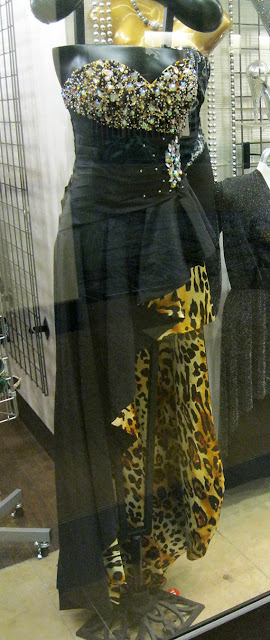
My workplace's building has touristy shops on the first floor. One store offers clothing that suffers from a "lack of editing," to quote Project Runway again. 

All items, from jeans to gowns to jewelry, have about a half dozen-too-many design elements, chosen for maximum look-at-me-ness. Each dress features stew of sequins, strapless, backless, sheer netting, cut-outs, cut-down-to-there, cut-up-to-there, asymmetrical hems, ruffles, plastic jewel encrusting, foil imprints, animal prints, rosettes, grommets, laces, chains, laces...you name it.


Take the dress at right for example. Remove the:
1. leopard lining
2. high-low asymmetrical hem
3. encrusting on the side wrap
4. whatever might be happening in back (You can't see the reverse so god only knows what's going on there.)
...and it could be wearable, if the plastic "jewels" don't look too bad once you get close.  

A different section of the window display, while still trashy, makes for a fun Photoshop project.

See below...
The original photo.
The second dress on the left has foil, sequins, an under mini skirt with a high-low asymmetrical over-skirt of lacy ruffles and a strapless sweetheart neckline. Niiiice. The black number on the far right on the right body on the right occasion might not be bad.

I made a duplicate layer of the original photo and used the Paint Daubs filter on it.
I don't know what the settings were...I just messed around until I liked how it looked.

I duplicated the original layer again and used the Poster Edges filter on it.

I added a layer mask to the top layer (Poster Edges) and used a wide brush at low flow to paint out the
Poster Edges where I wanted the soft Paint Daubs layer to show through.
It's still trashy, but now it's trashy and dreamlike.
 And sorry, still no new beads to show. Since November a new romance has filled most of my former clay time and it has its own kind of creative energy. But never fear, I'll get back to the worktable eventually.

Thursday, February 2, 2012

Genius Fake Commercial! Pro-pixel intensifying technology!

Kudos to Jesse Rosten! The video below is extremely clever and well-executed. You must watch!! (I'm guilty of abusing the pixels! I gave myself a Photoshop nose job a few weeks ago but it was just for fun, not deceitfulness!)

Fotoshop by Adobé from Jesse Rosten on Vimeo.

LinkWithin

Related Posts with Thumbnails